

hussien-11
Senior Content Specialist
من جيم سبوت
زيلدا أوكارينا اوف تايم

الخريطة و الأدوات موجودة على الشاشة السفلية
ريزدنت ايفل ميرسنريز

ريدج ريسر ثري دي
ننتندوجز + كاتس

كيد ايكاروس ابرايزنج

سوبر ستريت فايتر4
سوبر مونكي بول


40 سيارة مرخصة و 17 تراك في اللعبة ، سيارة البوجاتي فيرون متواجدة.
زيلدا أوكارينا اوف تايم
اللعبة - بحسب الموقع - مقاربة لمستوى توايلايت برنسس الرسومي ، كما كنت أتوقع .. اللعبة ستكون رائعة in-motion .What It Looks Like: In a nutshell, Ocarina of Time looks like a much sharper, cleaner version of the Nintendo 64 classic. The textures have been improved, character faces are more detailed, and the whole thing looks comparable to The Twilight Princess in terms of graphical fidelity.
اللعبة تستخدم مستشعر الحركة المتواجد في الجهاز أيضا لتحريك الكاميرا ، جميلHow It Plays: The controls have transitioned quite well over to the 3DS hardware. The four face buttons control your jumping and various weapon abilities, while the slide pad is used to run around the world. The only real change to the controls is a new feature that takes advantage of the 3DS's built-in motion-sensing gyroscope. When you jump into first-person mode, you can aim the camera around either by using the slide pad or by simply moving the 3DS unit around in front of you. The hardware does a remarkably good job of detecting slight movement, though in our experience we had a tendency to "lose" the 3D effect when we moved the system around too much. And then, since this is still a DS system, you've also got the touch screen on the bottom, which lets you access your gear and map without having to jump into a secondary options menu. Simply tap what you want to equip or a potion you want to drink, and it's taken care of.
الخريطة و الأدوات موجودة على الشاشة السفلية
ريزدنت ايفل ميرسنريز
أعجبتهم التفاصيل في اللعبة و بالأخص نماذج الشخصيات ، و المؤثرات المعهودة مثل انفجار البراميل الحمراءWhat It Looks Like: Between the textures in the two maps we played on (Spain and Africa, a la Resident Evil 4 and 5 respectively) and the detailed character models (the pattern on the back of Claire's jacket, for instance), Mercenaries 3D impresses visually, quite apart from the 3D effect. This is one of the games that really sells the 3DS's graphical capabilities, upgraded over that of its 2D predecessor. Character animations are likewise impressive, as are occasional spectacles--such as the fiery explosion of the inevitable red barrel.
How It Uses 3D: As a third-person game with an over-the-shoulder view for shooting, Mercenaries 3D puts your chosen character into the foreground--though, thankfully, the pop-out effect isn't off-putting. The 3D is at its most obvious with a scoped weapon when you switch into its zoomed view; the scope really stands up off of the screen.
How It Plays: The controls will feel quickly familiar to those who have played the recent Resident Evil games. It's stop-and-shoot rather than run-and-gun, with the usual over-the-shoulder aiming view. The circle pad is for movement, with a combination of face button and right shoulder for entering aim mode and firing, with the face buttons otherwise variously employed for collecting items, bashing bonus time crystals, shaking off zombies, jumping down from a roof, and the like. It's a touch fiddly at first, but only as much as, say, Resident Evil 5 was after a long break from playing 4.
The maps are strongly reminiscent of the Mercenaries maps in the earlier games, with staircases to climb and ledges to leap down from as you lead the slow-moving enemies on a merry chase. The key, as ever, is to keep moving, not let yourself get surrounded, and think strategically about extending your time for as long as possible to maximise your score.
اللعبة - كما هو متوقع - لا يوجد بها قصة وانما مخصصة للعب الجماعي و تبدو مشابهة كثيرا لطور ميرسنريز في ريزدنت ايفل5 ، و هي من أفضل الألعاب رسوميا على الجهاز إلى الآن .What We Say: It's a technical accomplishment--one of the most visually striking games for the 3DS available to play here at the European showcase. It looks--and quickly feels--impressively close to Mercenaries mode in the home console games. Those hankering for a slice of overblown Resident Evil drama will have to wait for Revelations, as there's no plot to be had here.
ريدج ريسر ثري دي
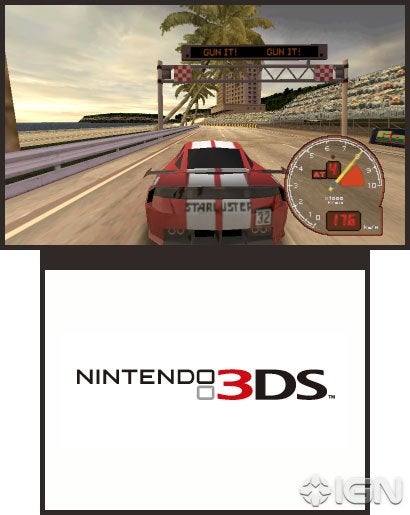
What It Looks Like: Ridge Racer 3D has put on some muscle, some American muscle. A whole new set of muscle cars and tracks are in the works for this entry. True to form, these are all still unlicensed vehicles and venues in a world alive with crisp, clean visuals that pop with color.
خاصية الثري دي تعطيك إحساس أكبر بما حولك في اللعبةHow It Uses 3D: Using the power of the third dimension, Ridge Racer 3D affords you a better sense of spatial awareness with its use of depth. It simulates the feeling of looking down a road and lets you better judge your positioning in relation to the other racers and to the track. A sharp turn off in the distance is easy to spot, and it's even easier to gauge how far you are from that spot. This might buy you a few key seconds to react accordingly. If you're coming up on another driver, the 3D view can help prevent an unwanted fender-bender as you attempt to overtake your opponent.
How It Plays: True to the series' pedigree, Ridge Racer 3D has the feel of an arcade-style racer. Accessibility trumps technicality, and a new easy drift mode option is available for the casual racer in each of us. Similar to the way drifting is handled in Nintendo's Mario Kart series, easy drift mode requires only a simple button press to send your car into a slide. Letting up on the button will then take you out of the drift and straighten out your car automatically.
The boost meter also returns in Ridge Racer 3D. Divided into three sections, this meter can be cashed in to get you that little extra boost of speed right when you need it. Sections can be fired off one, two, or three at a time depending on which combination of the 3DS's shoulder buttons you use. And if you're really stylish, you can boost into a curve, immediately go into a drift, and when you come out of that drift have a section of your boost meter refunded to you.
ننتندوجز + كاتس
الحيوانات الأليفة تبدو جميلة جدا في اللعبةWhat It Looks Like: Nintendogs + Cats includes some of the most wide-eyed, heart-melting puppies and kittens this side of your local pet shop. With a little 3D flair and an extra layer of detail on these digital pets, Nintendo hopes you'll fall in love with them all over again.
اللعبة تستخدم خاصية تعريف الوجوه و هذا يعني أن حيوانك الأليف سيكون قادرا على التعرف إليك و سيتعامل معك بشكل مختلفHow It Uses 3D: Using the 3DS's facial-recognition technology, your pets will be able to recognize your face when you're playing. They'll be friendlier and more responsive with you and will respond with trepidation when someone unfamiliar is playing. With the augmented-reality functionality, you will be able to view your pet on a physical space. You could transplant it onto your nice clean bed, rug, or lap and not have to worry about cleaning up endless amounts of animal hair. And naturally, when your pet hops up on the front of the screen with its paws, the 3D vision makes it seem like you could reach out and give it a high-five.
كيد ايكاروس ابرايزنج
انطباعات ممتازة، و هي من أفضل الألعاب استخداما لخاصية الثري دي إجمالا خاصة و أنها بنيت من الصفر للجهاز .How It Uses 3D: Given that the game has been designed to be a 3DS game, Kid Icarus: Uprising definitely highlights the hardware's capabilities. The flying and ground sections throw a lot at the screen for you to react to. The flying sequences offer the most dramatic showcase for the 3D visuals, but the ground combat sequences offer a broader range of 3D moments due to the different attacks used by the various enemies you'll face off against.
What You Do: The demo on display featured two "abridged" chapters from the upcoming game that offered two different difficulty levels. Chapter 1 (The Second Coming of Palutena) was the easy choice in the menu, while Chapter 4 (The Reaper's Line of Sight) offered the hard choice. Both levels featured the same basic level structure in that they started with an on-rails flying sequence that runs you through a set path in the sky. The flying segments segued into a ground combat section that lets you move freely and explore a modest-sized area on your way to face off against a boss. Chapter 1 offered an expectedly mellow run in the skies, which set up the game's conflict with Medusa and included tips from Palutena on how to play. This section culminated in a boss fight against Twinbellows, a fiery Cerberus-esque canine. Chapter 4 featured a much more challenging run through the skies that required a hefty amount of multitasking. You'll have to dodge obstacles in a canyon run, face tougher enemies on the ground, and go up against a massive Reaper boss that forces you to maneuver Pit between two floors to avoid being squashed.
How It Plays: The controls in the game made sense, although they could still use some refinement. You'll move Pit with the 3DS's analog nub. When you're in the air, this lets you dodge incoming enemy attacks or avoid obstacles by moving up and down or left and right. We were happy to see an onscreen icon on the touch screen that lets you switch between normal and inverted controls on the fly. When you're on the ground, you can move Pit around in the open areas. You'll attack in both flight and ground sections using the left trigger.
The demo let us choose from three weapons that featured unique attributes. The blades were the most balanced of the three, having no specific weakness. The claws offered greater attack speed but a shorter reach. Finally, the orbitars fired two powerful shots that grew in power after being released. There appeared to be two types of attacks that could be performed in the demo, each with a more powerful secondary option. Pit appears to automatically switch between melee and ranged based on the proximity of the enemy in your targeting reticle. You'll be able to perform a more powerful secondary charged attack that requires you to line up your shot and hold on firing to build up power. In addition, it appears that you'll automatically use attack items, like a grenade we picked up, with the next attack you perform after collecting them. Finally, you'll use the stylus and touch screen to move Pit's targeting reticle over enemies in flight. While this is also how targeting works on the ground, you'll also be able to rotate the camera around you by flicking right or left on the touch screen. The degree of rotation is based on how vigorous your flick is, letting you rotate in small increments or broader 180-degree chunks.
What We Say: Overall, we have to say we like how the game feels. The level structure keeps things moving along at a good pace, and there's definitely fun to be had. The controls feel almost right but need some refining (especially in the ground sequences where you need to control the camera with the stylus) to keep the experience smooth. We're also hoping the tongue-in-cheek tone of the demo--which had had Pit, Palutena, and Medusa bantering back and forth--actually makes it into the game. While there's not a specific date for Kid Icarus: Uprising's release outside of "2011," we'll be keeping a close eye on this one thanks to the positive impression it made on us. Though it still has some elements to refine, we really can't deny its appeal. Look for more on the game soon.
سوبر ستريت فايتر4
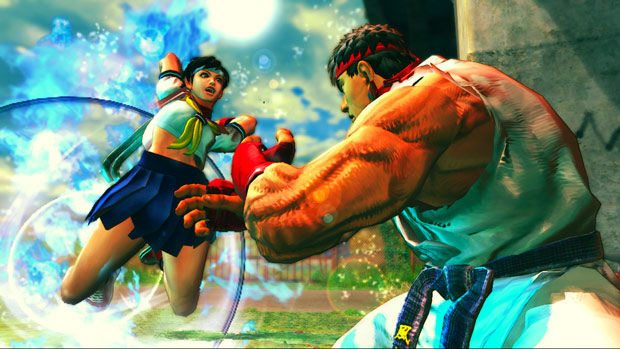
يبدو بأن جميع الملابس الإضافية متوفرة في نسخة الـ3DS من البداية @_@The 3DS's button layout isn't exactly ideal the Street Fighter six-button control scheme. Sure, you can get by with four face buttons and the two shoulder buttons on the 3DS if you're so inclined, but it can be a bit of a struggle to execute the moves as proficiently as you would with a stick or fight pad. Therefore, Capcom is introducing a few different control options that should not only appease Street Fighter vets, but also make the Street Fighter experience a bit more accessible to those previously intimidated by its control scheme.
For starters, there are two different control schemes to choose from--light and pro. The difference between these two setups is based around what you can map to individual buttons. In light mode, you can map both controller movement and button presses, so in theory, you could map a dragon punch or a fireball to a single button. Conversely, pro mode only lets you map multiple buttons to a single button, so an example would be mapping all three punch buttons to the Y button on the 3DS. If that isn't enough, you'll be happy to know that you can also customize and save moves into each of the four panels on the 3DS's touch-screen display that already has supers mapped to it.
Though we didn't get to multiplayer matches, you might think that offering such control schemes to players would inevitably make things a little unbalanced. Fortunately, Capcom will be including a feature that lets you filter out opponents based on your preferences, so if you don't want to play against players using the light option, then you don't have to. As for more details on multiplayer matches, there will be both local and global multiplayer matches, and like in the console games, you can set everything up in such a way that other players can challenge you while you're playing solo in the arcade mode of the game. Additionally, there will be a ranking mode similar to the one found in the Xbox 360 and PlayStation 3 versions, based on battle points. Up to six people within a local area can also watch multiplayer matches and can do so in either the standard view or the new 3D view.
3D view in Super Street Fighter IV: 3D edition places the camera high over the shoulder of your selected character. This view does a really nice job of showing off the great character models as well as the 3DS's 3D effect. That being said, in the brief time we spent with 3D view, it takes some time to get used to. We had a little trouble measuring the distance of fireballs (in other words, we jumped into them--often), but we'll be interested to see if we get more acclimated to the new perspective with a little extra time.
When playing multiplayer matches, you can use the camera perspective you prefer, so one player might be using the 3D view, while the other can use the standard view. It's worth mentioning that both perspectives use the 3DS's 3D effect, which can be turned off completely for both views by using the slider. If you do turn off the 3D effect, the frame rate will get a little extra boost, but even with 3D turned on, the frame rate is fine.
In addition to arcade, versus, training, and challenge modes, Super Street Fighter IV contains a StreetPass-specific mode where figurines do battle. There are approximately 500 figurines in the game that can be found either by grinding for them in various modes or by entering a lottery option. Each figurine has its own unique set of stats that come into play when you come across someone else with the game and figurine data. When you're not actively playing the game, your figurines will do battle with another player (via StreetPass), and you can find out the results of these matches when you start playing the game again.
A few more extra details: It seems all of the costumes from the Xbox 360 and PS3 versions of the game will be available in the 3DS version from the start. There's also a game-sharing feature where you can send a limited number of characters and levels to other people without the game so they can give it a try until they turn the system off. But overall, the game plays just like the console versions, and while there are some slight changes to the backgrounds (some objects don't animate like they do in the console versions, and there's some detail missing), the game looks great. We'll bring you more on Super Street Fighter IV: 3D Edition as it becomes available.
سوبر مونكي بول
اشفالت ثري ديWhat does it look like? Crisp, colorful, charming--not so far from the iPhone version, but now in three dimensions. It won't be the game to push the 3DS's graphical capabilities to the limits, but the levels look good, with the 3D effect really making them pop.
How does it use 3D? In the main mode, in which you roll the titular simian sphere around the level, the 3D effect draws the ball into the foreground, with the tilting level leading off into the "distance." In the Race mode, the 3D effect similarly foregrounds your racer, adding perspective, with the racetrack appearing to stretch back into the screen. The third mode, Fight, is a platform-based side-scrolling affair. Here the 3D adds just a shade of depth to the otherwise 2D levels.
What do you do? In the Challenge mode, you collect bananas with your imprisoned rolling monkey, aiming for the goal hoop at the end and trying not to fall off the edge of the free-floating level. Familiarly, you maneuver the ball by tilting the level. In the Cart Racer mode, you race against other chimps, zipping through hoops on the track and doing sweet jumps off ramps. In the Fight mode, your monkey does battle with three others along those 2.5D platforms, initially nabbing bananas as fast as you can; then, once there are no bananas left to be nabbed, you knock seven bells out of each other to steal banana caches. The winner is the monkey left with the most bananas at the end of the timed battle.
Though the demo at the Amsterdam showcase event was single-player throughout, there were non-selectable Versus options in the menu screens, indicating the expected multiplayer modes.
How does it play? The Challenge mode offers two control schemes: One uses the 3DS's gyroscopic sensors, letting you tilt the device to tilt the level, as in the iPhone game; the other has you use the analog thumbpad (the "circle pad," the game calls it) to do the same. The latter seemed to work best; the circle pad is comfortable and precise, while using the motion sensors in the 3DS occasionally led to us tipping the screen in such a way that spoiled the 3D effect--the effective viewing angle for the 3D effect is rather narrow, remember. Someone who prefers the motion-sensitive scheme could use the 3DS's slider to turn the 3D effect down, at least.
The Race mode uses the circle pad for steering, with face buttons used for braking and accelerating. The handling is as easygoing as you might expect, geared for competitive cart racer fun rather than serious sim racing. The Fight mode incorporates the circle pad for navigating left and right along the platforms, with face buttons used for jumping and punching.
What we say We took a look at the Monkey Island and Aladdin's Castle zones in the Challenge mode, trundling along magic carpets in the latter against a distant Taj Mahal-like backdrop. The handling was nicely tuned--not too sensitive in either control scheme. Though, as mentioned, the screen-tilting method seemed to impact the 3D effect. There's plenty of charm, smart visuals, and variety among the three distinct game modes.
لعبة سباقات جيدة جدا و كان لها جزء مع بدايات الـDS الأول ، عن نفسي أفضلها على لعبة ريدج ريسر من نامكو .What It Looks Like: Aside from the ridiculous amount of nitro boost pouring out of your car when you hit the turbo button, Asphalt 3D has a pretty realistic look for an arcade racer. You can chalk that up to the fact that it’s got more than 40 licensed vehicles from Lamborghini sports cars to Ducati motorcycles, as well as 17 tracks set in real-world cities, such as San Francisco and Paris.
How It Uses 3D: It’s hard to really pick up on the 3D visuals when you’re playing the game because everything moves by you so quickly, but once you slow down, you can get a better sense of how Asphalt 3D uses this newfangled technology. Specifically, you can jump into the Garage mode and ogle, say, your Lamborghini Murcielago or your Bugatti Veyron as they spin around on an elegant podium. As one neat little feature, you can use the 3DS motion-sensing gyroscope to move the system around, which also affects the camera angle your viewing the car at in Garage mode.
What You Do: Asphalt 3D is a pretty basic arcade racer where the rubber meets the road, but there are quite a few different game modes and other various features.. Among the eight different game modes is Vigilante, an elimination mode where every so often the last-place racer is cut from competition, and High Speed Chase, a Need for Speed-inspired mode where you have to outrun the cops. Ubisoft tells us that the career mode will last about 18 hours, giving you the option to customize your new rides along the way with a decal editor.
How It Plays: Asphalt 3D controls well enough in terms of car handling, but we had a problem with the way controls are mapped. Basically, you hit the A button to accelerate, B to brake, R to use any nitro boost power-ups you’ve picked up on the track, and L to switch camera views. In our experience, rolling your thumb around to switch between braking and accelerating was a little awkward--we’d much preferred to map the brake to the L button to give our thumb the chance to sit tight on the gas pedal and alleviate those awkward micro-movements you need to brake. Unfortunately, there’s no alternate control option to do so that we could find. But aside from that little issue, Asphalt 3D controls fine, allowing you to maintain a pretty good control of your car even when going full throttle on the turbo.
What We Say: Aside from slightly awkward control inputs, Asphalt 3D looks like a solid if unspectacular arcade racer. Nothing about it really seems to be pushing the genre forward, but it nonetheless strikes us as a well-made game with a number of different features to maintain your attention. We’ll see how the final product turns out when it’s released shortly after the 3DS.
40 سيارة مرخصة و 17 تراك في اللعبة ، سيارة البوجاتي فيرون متواجدة.


